Self-hosted ecommerce platform for developers

One engine. Two commands per box. Stores for clients.

Stop rebuilding checkout for every client. Install the engine, hand over the admin. A NestJS REST API on PostgreSQL, Redis and Prisma, an Angular admin dashboard and a server-rendered Analog.js storefront in French, English and Arabic, with cash on delivery, gift cards and an offline license. Launch with the included storefront, or build your own on top of the API: headless commerce is a capability here, not the identity.

The repository opens to the public with the first release. Until then, access is by request.

setup.ps1 · local profile · real transcript
themerchantengine setup v1.1.0

[1/14] Profile and box role

[2/14] License file
  !   running unlicensed; the admin will show the license as missing

[3/14] Store identity

[4/14] Domains
  local profile: http://localhost:53300, http://localhost:53200, http://localhost:53000

[5/14] Brand

[6/14] Locales and timezone

[7/14] Currency, tax and shipping

[8/14] Asset storage
  local profile: assets are written to ./uploads on this machine

[9/14] Transactional mail
  local profile: console transport, nothing leaves this machine

[10/14] Sign-up bot protection (Turnstile)
  local profile: sign-up runs without a captcha

[11/14] Payment methods

[12/14] Admin owner account

[13/14] Demo catalogue

[14/14] Summary and confirm
  profile: local
  store: Demo Store (demo), FR
  domains: http://localhost:53300 | http://localhost:53200 | http://localhost:53000
  license: none (unlicensed)
  brand: #1F4E79 + #F2B441, latin-rounded
  locales: en, fr (default en), Europe/Paris
  money: EUR € after, 2 decimals, VAT 20% TTC, shipping 7
  storage: local
  mail: console from Demo Store <noreply@localhost>, redirected to owner@demo.example
  turnstile: off
  payments: cod, manual
  owner: Demo Owner <owner@demo.example>
  demo catalogue: yes

[1/8] Write the environment, the store config and the rendered stack
  ok  deploy/local/docker-compose.yml and deploy/local/.env written

[2/8] Build the images from source

[3/8] Start Postgres and Redis, create the app role and database

[4/8] Push the schema, the search index and the extra indexes

[5/8] Seed the store config, roles, templates, tax, shipping and payment methods

[6/8] Create the admin owner account

[7/8] Start the whole stack

[8/8] Smoke: health, the public config and the front doors
  ok  the API health: http://localhost:53000/health
  ok  the public store config: http://localhost:53000/api/v1/store/config
  ok  the admin login page with its security headers: http://localhost:53200/
  ok  the storefront: http://localhost:53300/

backend server installed successfully!
admin: http://localhost:53200/
owner login: owner@demo.example

storefront server installed successfully!
storefront: http://localhost:53300/

A real run of the installer on a laptop, trimmed to the step lines. The server transcript replaces it after the first fresh-box rehearsal.

What you get

Four things, one install.

One generic build, configured at install. No client branch, no build per client: identity, brand, locales, money and domains live in the store settings and every app reads them at runtime.

The API

A NestJS REST API on PostgreSQL and Redis: catalog, cart, checkout, orders, inventory, payments, promotions, gift cards, reviews, returns, shipping, notifications, SEO, analytics, RBAC and an audit log, in 34 modules behind one public config endpoint.

$ curl -s http://localhost:53000/api/v1/store/config
{ "data": { "identity": { … }, "brand": { … },
  "localization": { "supportedLocales": ["en","fr"],
                    "defaultLocale": "en", "rtlLocales": [] },
  "money": { "currencyCode": "EUR", "displayPrecision": 2 } } }

The admin

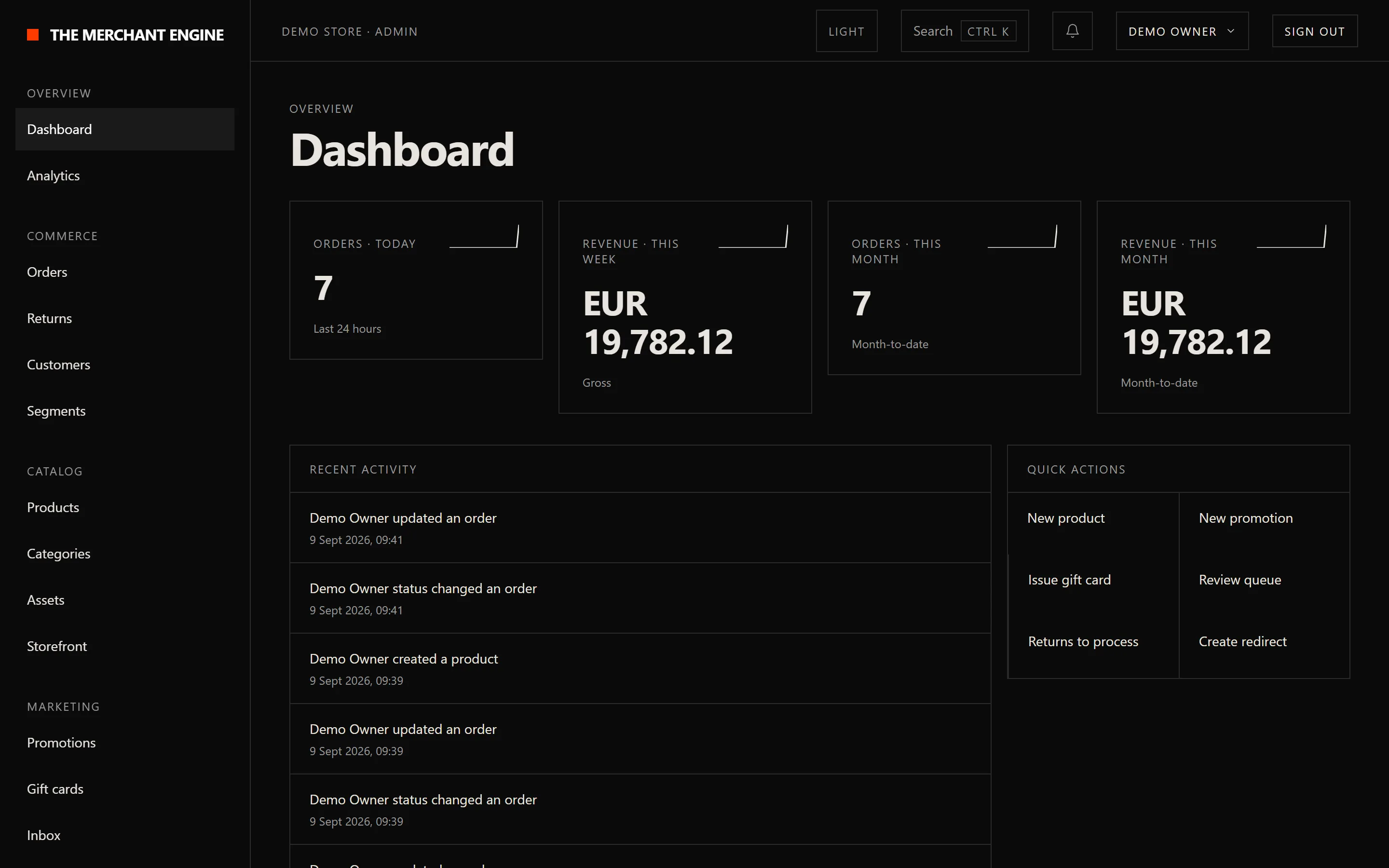
An Angular dashboard for the store owner: orders with statuses, payment states, filters and CSV export; catalog, customers, promotions, gift cards, reviews and returns; analytics with revenue, conversion, funnel drop-off, product performance and tracking pixels; notifications, roles, and the settings for identity, brand, localization, money, domains and the license. Dark and light: the frame below follows your own colour scheme.

Admin dashboard, in dark or light mode to match the reader's own scheme: revenue and orders tiles with sparklines, a recent activity feed and quick actions.

The storefront

A server-rendered Analog.js storefront: home, catalog, search, cart, checkout and customer accounts, in the locales the store enables, mirrored for Arabic, with sitemaps, structured data and llms.txt served.

Storefront catalog page in English: category chips, a brand and price filter rail, a sort control, and product tiles with prices, a sale badge and wishlist buttons.

The installer

A stepper that asks for every store-specific value once, verifies storage, mail and bot protection live before it proceeds, renders the stack, builds the images on the box, seeds the store and the owner, issues TLS and probes the result. Idempotent and resumable: an update is a re-run on a newer tag.

$ ./setup.sh --profile both
# or, on a laptop:
$ ./setup.sh --local
> .\setup.ps1
storefront · product · English, EUR
Storefront product page in English: gallery, name, rating, reference, a price in euros with the tax mention, stock state, quantity, add to cart and wishlist buttons.

Same engine, left to right. A store that enables English and French, prices in euros shown tax included, from the store settings alone.

storefront · product · Arabic, AED
The same storefront product page in Arabic: the layout mirrored right to left, an Arabic font kit, and a price in dirhams with the symbol before the number.

Same engine, right to left. A store that enables Arabic and English with Arabic as default: the layout mirrors, the font kit changes, the dirham sits before the number. No code changed between the two.

How it works

Prepare. Install. Hand off.

It is not a library you add to a project. It is a stack you install on a box, or on a laptop, and hand to a store owner.

STEP 1

Prepare

A Linux box with Docker, Compose v2, git and Node 22. DNS for the store, the admin and the API. A bucket, a Resend domain, a Turnstile widget and a license file. The requirements page links to every console.

STEP 2

Install

Clone, then one command per box. The stepper verifies each integration live, so a wrong key stops the install rather than the first order. Nothing answers on a public port before the owner account exists. Every prompt, in order.

STEP 3

Hand off

The owner signs in, sets the brand, the locales and the money, adds the first product in two locales and places a cash-on-delivery test order. Nightly dumps and certificate renewal are timers, already installed. The first hour.

Two ways to build

Brand the storefront, or build your own.

Brand the shipped storefront

Colours, font kit, logo, locales and money come from the store settings; the storefront renders its tokens from them at request time. Hero sections, banners and featured rails are content the owner manages from the admin, no deploy needed. What each settings screen controls.

Build your own on the REST API

Every storefront call is a documented REST endpoint with a stable envelope, error codes in every locale, idempotency keys on order creation and a public store config to render from. The shipped storefront is the reference implementation. Start in the docs.

Features

The hard part, already built.

Checkout & orders

Cart, checkout, order lifecycle, refunds and returns. Idempotent order creation with X-Idempotency-Key, so a double click never creates two orders. How it works. In the docs.

Race-safe inventory

Stock, products and variants with atomic, WHERE-guarded decrements. No overselling when two buyers hit the last unit at once. In the docs.

French, English, Arabic

Every product, category, page and email is a translatable record with one value per enabled locale. A store picks any pair or all three and a default; the storefront mirrors its layout for Arabic. How it works. In the docs.

Money from config

Any currency with its symbol, position, separators and zero to three decimals, set once at install and formatted the same way in the API, the admin and the storefront. In the docs.

Cash on delivery, transfer, gift cards

The tenders regional stores run on, live: cash on delivery, manual transfer, and gift cards with race-safe balances. Promotions, coupon campaigns, reviews and wishlists beside them. How it works. In the docs.

Transactional email & invoices

Per-locale templates the owner edits in the admin, sent through Resend with a delivery receipt tracked per email. Server-rendered PDF invoices, Arabic included. In the docs.

SEO & GEO machinery

Server-side rendering, sitemaps, structured data, redirects, IndexNow pings and a Search Console indexing dashboard inside the admin. llms.txt and llms-full.txt rebuilt from the live catalog for AI search. How it works. In the docs.

Security floor

Role-based access control, an audit log on every admin action, bot protection on public forms, two-factor and magic-link sign-in, soft deletes, and a request id on every log line. In the docs.

Offline license

A signed file verified at install and at boot. No license server, no telemetry, nothing on the box calls home. Expiry shows a banner and never stops the store. How it works. In the docs.

Admin in light and dark

A semantic token layer with both colour modes, and a brand settings screen that previews the palette and reports the contrast of every pair before the owner saves it. In the docs.

Integrations

Wired to the services a real store runs on.

Live means shipped in the engine, and for the third-party services (storage, mail, Turnstile, Search Console and Bing) verified with a real call by the installer before the store answers on a port. Payment providers plug into a locked, server-side allow-list, so adding one is a code change, not a config hole.

Payments ✓ Live
Payments ✓ Live
Payments ✓ Live
Transactional email ✓ Live
Bot protection ✓ Live
SEO · Google ✓ Live
SEO · Bing ✓ Live
GEO · AI assistants ✓ Live
Media & assets ✓ Live
Rates & carriers ✓ Live

Card gateways are not in v1. The provider allow-list, the idempotent payment flow and the webhook dedup they plug into exist, and Stripe is the first provider to write. The recipe for adding one lands in the docs with the customize track.

Pricing and license

Free to run. Paid when it takes money.

Two licenses, one rule. A store that takes no money runs under PolyForm Noncommercial: personal, educational and nonprofit stores, free. A store that accepts an order for money needs a yearly commercial license, sized by how many live stores it covers. An agency licenses once and installs per client.

Single

One live store

USD 349 / year

EUR 329

Founder rate USD 199, EUR 189

Studio

Up to five live stores

USD 899 / year

EUR 849

Founder rate USD 549, EUR 499

Agency

Twenty stores under one license

USD 1,899 / year

EUR 1,790

Founder rate USD 1,199, EUR 1,090

Unlimited

As many stores as you run

from USD 4,900 / year

A conversation, not a checkout. Write to us.

Founder rate from USD 2,990

Founder rates apply to the first twenty licenses and stay locked for the life of the subscription. Renewal is at list price, same tier. Gulf zone (Qatar, Saudi Arabia, the Emirates, Kuwait, Bahrain, Oman), the same figure in QAR, SAR or AED: Single 1,290, Studio 3,290, Agency 6,900, Unlimited 17,900. Maghreb zone (Tunisia, Algeria, Morocco, Egypt), in TND: Single 490, Studio 1,190; Agency and Unlimited at the global price. Every price is per year.

What counts as a paid store

A store is commercial from the moment it accepts an order from a customer for money, by any tender. A store in setup, a staging copy or a demo with test payments only is not a paid store.

How you get a license file

Every production boot needs a signed license file, even a noncommercial one. A free thirty-day evaluation license, bound to your domain, is issued on request; paid tiers are issued by hand. Get a license.

What happens at expiry

A banner thirty days before, a grace banner for thirty days after. The store keeps running and no edit is blocked. A lapsed license keeps the release it has and does not get new ones. Renewal.

Proof

Numbers from the gates, not from the copy.

Every push

Unit suites, end-to-end suites against a real PostgreSQL and Redis, lint, the three production builds, a secrets scan of the tree and the history, and an install smoke that runs the real installer twice on a fresh box.

Measured install

Seven minutes for a first local install on a Windows laptop with Docker Desktop, twenty-six seconds for a re-run. The server number is measured on a fresh box before the first release and lands here, not typed.

Brandless by construction

A guard on every push refuses any client name in the tree, and the fixtures the docs and this page are captured from are fictional stores. What you install is what every client gets.

FAQ

Questions a developer asks first.

Every answer stands on its own. For anything else, write to bbadii@pm.me; the founder answers every message himself.

What stack is The Merchant Engine built on?
A typed TypeScript stack: a NestJS API on PostgreSQL and Redis with Prisma, an Angular admin dashboard, and a server-rendered Analog.js storefront, installed together as a self-hosted ecommerce platform. The API is a REST surface, so a storefront in React, Vue, Svelte or anything else builds on the same endpoints: headless commerce when you want it, a finished storefront when you do not. No lock-in to a page builder.
What do I need before installing?
For a server: a Linux box with Docker Engine and Compose v2, git and Node.js 22, DNS for the store, the admin and the API, an S3-compatible bucket, a Resend account with a verified domain, a Cloudflare Turnstile widget and a license file. For a laptop: Docker Desktop, git and Node.js 22, nothing else. The requirements page links to the console where each one is created.
Does it run on Windows?
The local profile does, through setup.ps1 on Docker Desktop, with the demo catalogue and every email kept on the machine. A server install runs setup.sh on a Linux box, because that is where the certificates and the timers live. Install locally.
Is this just another no-code template?
No. It is a stack you install and build on: an API, an admin and a storefront with their source, not a page builder. You keep the code and change what you need.
Do I have to build a storefront, or is one included?
One is included: a server-rendered storefront with home, catalog, search, cart, checkout and customer accounts, in French, English and Arabic with a mirrored layout for Arabic. Brand it from the admin and launch, or treat it as the reference implementation and build your own on the same REST API.
Which languages and currencies does it support?
French, English and Arabic: a store enables any pair or all three and picks a default, and the storefront mirrors its layout for Arabic. Any currency, with the symbol, its position, the separators and zero to three decimals set at install and served to every app from the store config, so a three-decimal dinar and a two-decimal riyal render right without code.
Which payment and shipping providers are supported?
Live: cash on delivery, manual transfer and gift cards, on an idempotent payment flow with webhook dedup. Not in v1: card gateways. The provider allow-list, the payment flow and the webhook dedup they plug into exist, and Stripe is the first provider to write. Shipping is zone-based rates with carrier and tracking management.
Can't I just vibe-code this with AI?
You can get a checkout working with AI in an afternoon. The hard part comes after: race conditions on inventory, idempotent orders and payments, refunds and returns, webhook retries, access control and the security holes you only find once a store takes real money. The Merchant Engine is that part, already built, with the tests that prove it, so you are not one prompt away from overselling stock or leaking customer data.
Do I keep control of the code, or is this a black box?
You get the source. The engine is source-available under the PolyForm Noncommercial license; a store that takes money needs a commercial license, and either way the code runs on your box with no telemetry and no license server.
Can I use it on client projects and bill for it?
Yes, with a commercial license. The Studio tier covers up to five live stores and the Agency tier covers twenty stores under one license, so an agency licenses once and installs per client. Pricing.
What happens when my license expires?
The admin shows a banner thirty days before expiry and a grace banner for thirty days after. The store never stops and no edit is blocked. By the license terms a lapsed license keeps the release it has and does not get new ones until it is renewed; the engine does not yet enforce that in code, and the renewal page says so.
Is there telemetry or a license server?
No. The license is a signed file verified offline at install and at boot. Nothing on the box calls home.
It's v1. How stable is it really?
Every push runs the unit suites, the end-to-end suites against a real database, the lint, the production builds and an install smoke that runs the real installer twice on a fresh box. The counts on this page are read from the release, not typed.
How much does it cost?
Free under PolyForm Noncommercial for a store that takes no money. A store that takes money needs a yearly commercial license: Single at USD 349, Studio (up to five stores) at USD 899, Agency (up to twenty stores) at USD 1,899, and Unlimited from USD 4,900. Gulf and Maghreb price zones exist, and the first twenty licenses get founder rates locked for the life of the subscription. Every number.
Who's building this, and why should I trust it?
Badii Boutar, a full-stack developer with three years of ecommerce behind him: ten or more client stores shipped, the number one livestock marketplace in Saudi Arabia, and Peeps at 85K+ installs. The engine is built in public and every claim on this page points at the code that proves it.
The story

After 10+ ecommerce stores built from scratch, I finally built the one I keep for myself.

Hey, I'm Badii 👋 I've built ecommerce for three years, for clients, for myself, and now as infrastructure for other devs. 10+ stores shipped from idea to live checkout. Built the #1 livestock marketplace in Saudi Arabia. Shipped Peeps to 85K+ installs. Every project started by rebuilding the same backend from scratch. That shouldn't be the job, so I'm fixing it in public. Built by a dev who shipped this 10+ times by hand, so you don't have to.

10+
Stores shipped
85K+
Peeps installs
#1
Marketplace in KSA

Install it today

Two commands per box. Then hand over the admin.

Clone the engine, run the installer, answer the prompts once. The docs take you from an empty box to a store that takes cash-on-delivery orders.

git clone <the engine repository> themerchantengine
cd themerchantengine
./setup.sh --profile both
Read the install guide

The repository opens to the public with the first release. Request access until then.